
Download all photos — as one zip file
The whole event in one file, in full resolution. We package the photos for you and email you when the download is ready.
Five steps to the photos on your own computer
The download starts from the Gallery tab and is free on every plan — even if you never extend storage.
- Step 1
Approve the last photos first
The zip contains approved photos only. If you're running moderation: open the Gallery tab, go to the Pending filter and clear what's left. Anything you don't approve won't be in the download.
- Take the chance to hide or delete what you don't want included — easier now than sorting a folder of 800 files later.
- If moderation is off, every photo is already approved and you can go straight to the next step.
 Step 2
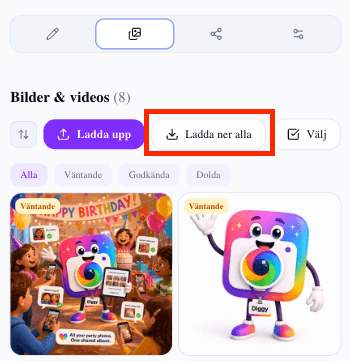
Press Download all
In the Gallery tab, above the photo grid, sits the Download all button. One press starts the packaging: we collect every photo and video, put them in a zip and make it ready to download. You don't have to keep the page open while it runs.
- You and your co-organizers can both request the download. The link is emailed to whoever ordered it.
- If you've already requested a zip and nothing has changed since, you get the same file immediately without waiting again.
- If new photos have come in since the last download, a new file is packaged with everything that's there now.
- Step 3
Wait for the email
Packaging takes anything from a few seconds to a few minutes depending on how many photos and videos the event holds. When the file is ready we email you, and a banner with a Download zip button appears on the event page. You can close the tab in the meantime.
- Videos take longest — an event with a lot of footage may need a few extra minutes.
- No email? Check spam, and look at the event page. The banner shows there as soon as the file is ready.
- If packaging fails you get an error and can try again straight away.
- Step 4
Download and unpack the file
Press Download zip in the email or in the banner on the event page. The file downloads as usual in your browser. Double-click it to unpack — Windows, macOS, iPhone and Android all handle zip files without extra software.
- Download on a computer rather than a phone. A multi-gigabyte zip is rarely pleasant to handle on mobile.
- The download link is valid for seven days. If it expires, just press Download all again for a new one.
- Photos come in full resolution. HEIC and PNG are converted to JPEG so they open anywhere; other formats keep their original.
- Step 5
Save it in two places — and you're done
Move the unpacked folder to wherever you actually keep memories: an external drive, a cloud service or your computer's photo library. Put it in two places if you can. Once the photos are downloaded and safe, it no longer matters when the event's storage period ends.
- The zip holds two folders: bilder with what guests see, and bildspel with anything you marked as slideshow only.
- Want the gallery to stay online longer? You can extend storage monthly and cancel whenever — but downloading is always free.
- You get a reminder 14 days before the storage period ends, so there's time to download without rushing.
What's in the zip — and what isn't?
The download is exactly the event's approved content, in two folders. Here are the details that tend to surprise people.
Two folders, one event
The folder bilder holds everything guests see in the gallery. That's the folder you pass on to the family, the couple or your colleagues.
The folder bildspel holds the photos you marked as Slideshow only — things that ran on the big screen but never appeared in the guest gallery. The split means you can share one folder without accidentally sharing the other.
Only approved photos are included
Photos still sitting in moderation as pending are not included. Neither are photos you hid or deleted. That's the most common reason someone thinks photos are missing from the zip.
So always clear the Pending filter before requesting the download. If you approve something afterwards you'll need a fresh zip to include it.
Full resolution, with one exception
Photos are kept at the resolution guests uploaded — we don't compress them down. The only thing that changes is the format: HEIC from iPhone and PNG are converted to JPEG so the files open in anything, while JPEG and video keep their original format.
Filenames are the guests' own, and the uploader's name travels with the event rather than being written into the filenames.
The link lives for seven days
A finished download stays valid for a week. That's plenty, but being late costs nothing: press Download all again and we package a new file for you, as free as the first.
If nothing has changed in the gallery since last time, you get the same finished file back instantly. If new photos have arrived, a new zip is built with everything.
Downloading versus storage time
Storage time governs how long the gallery stays online — 14 days on the free plan and three months on the paid plans, counted from the first upload. Downloading is a different thing: it's always free and included on any plan.
Extend storage monthly and the gallery stays up for your guests to keep browsing. Choose not to extend and the zip is what you keep — so download before the time runs out.
We never delete without warning. The reminder arrives 14 days ahead, both when a free period and when a paid storage period is coming to an end.
Sharing it onwards with your guests
Guests rarely need the whole zip. As long as the storage period is running they can open the gallery through the same link they uploaded with and save the photos they want.
If you do want to share the whole folder afterwards, a cloud link usually beats emailing several gigabytes. Just think about who gets the link — everything your guests uploaded is in that folder.
Common questions about the download
What organizers wonder once the party is over.
Does downloading the photos cost anything?
No. The download is free on every plan, and it's included whether or not you extend storage. You can always get your photos home.
How long does packaging take?
From a few seconds to a few minutes depending on how much the event holds. Videos take longest. We email you when the file is ready, so you can close the tab meanwhile.
Why are some photos missing from the zip?
The zip contains approved photos only. Photos still pending in moderation, or ones you hid, aren't included. Approve them and request a new download.
How long does the download link work?
Seven days. If it expires, press Download all again for a new file — it costs nothing extra.
Do the photos keep their quality?
Yes. Photos are at the resolution guests uploaded. HEIC and PNG are converted to JPEG for compatibility; other formats are kept as they are.
Can my co-organizers download?
Yes. You and your co-organizers can both request the download, and the link is emailed to whoever ordered it.
Can guests download the photos themselves?
Guests can open the gallery through the invite link and save individual photos for as long as the storage period runs. The zip of the whole event is for you as the organizer.
What happens to the photos when storage time runs out?
The gallery disappears and the photos are deleted — but never without warning. You get a reminder 14 days ahead and can choose to extend storage or download everything first.
Read next
Where to go once the photos are home.
Collect the photos — and take them home afterwards
Downloading is free on every plan. The photos are yours.